<?xml version="1.0" encoding="UTF-8"?>
<feed xmlns="http://www.w3.org/2005/Atom">
  <title>Don't be eval</title>
  <link href="https://www.gertgoet.com/atom.xml" rel="self"/>
  <link href="https://www.gertgoet.com"/>
  <updated>2025-12-26T10:38:56+00:00</updated>
  <id>https://www.gertgoet.com</id>
  <author>
    <name>Quick Blogger</name>
  </author>
  <entry>
    <id>https://www.gertgoet.com/appquery.html</id>
    <link href="https://www.gertgoet.com/appquery.html"/>
    <title>App Query: when SQL is all you need</title>
    <updated>2025-12-25T23:59:59+00:00</updated>
    <content type="html"><![CDATA[<div><p>I recently found myself working on a fairly extensive data export for a Rails application. My first stab was to take a builder-template, a collection of records and a sprinkle of helper-functions to generate the required XML.</p><p>This approach quickly hit its limits: it was hard to get rid of N+1 queries, the performance was abysmal due to both inefficient sql and the sheer volume of AR-instances that were instantiated. And Arel, while a great abstraction otherwise, made it hard to identify the bottlenecks. Meanwhile I had a nagging feeling that &quot;this shouldn&apos;t be too hard in raw SQL&quot;...</p><!-- end-of-preview --><p>In the end, I chose to disregard the sunk cost and refactored to raw SQL. The result was a blazingly fast export, eliminating the intermittent timeouts that some customers experienced. Additionally, the process gave me a deeper understanding of the data model and a new appreciation for PostgreSQL functions — many of which made existing Ruby helper methods unnecessary.</p><p>In the process I created <a href="https://github.com/eval/appquery">App Query</a>, a gem designed to make integrating raw SQL with Active Record simpler and more enjoyable.</p><p>Let&apos;s take a closer look.</p><h2 id="tinkering">Tinkering</h2><p>Let&apos;s take a query that returns accounts for an organization.<br />When tinkering on the console, you&apos;d instantiate it like so:</p><pre><code class="language-sql">q = AppQuery(&lt;&lt;~SQL)
  SELECT *
  FROM accounts
  WHERE
    accounts.organization_id = :org
SQL
</code></pre><p>Then to retrieve results (i.e., a collection of maps):</p><pre><code class="language-ruby">q.select_all(binds: {org: 2}).entries
#=&gt; [{&quot;id&quot; =&gt; 1234,
#     &quot;organization_id&quot; =&gt; 2,
#     ...},
#     ...]
</code></pre><p>Just like when using <code>ActiveRecord::Base.connection</code>, there&apos;s also <code>select_one</code> and <code>select_value</code>. Though unlike ActiveRecord, all these methods will cast the results by default, e.g. this works:</p><pre><code class="language-ruby">AppQuery(%{select array[1,2]}).select_value
#=&gt; [1,2]
</code></pre><p>While AR forces you to go the select_all-route:</p><pre><code class="language-ruby">ActiveRecord::Base.connection.select_all(&quot;select array[1,2]&quot;).cast_values.first
</code></pre><p>With AppQuery, additional castings can be provided as well:</p><pre><code class="language-ruby">cast = {&quot;date&quot; =&gt; ActiveRecord::Type::Date.new}
AppQuery(%{select &apos;2024-1-1&apos; as date}).select_value(cast:)
=&gt; Mon, 01 Jan 2024
</code></pre><p>Especially ideal for SQLite that doesn&apos;t have a notion of e.g. dates and timestamps.</p><p>After the exploratory phase, this query can live in a separate file, e.g. <code>app/queries/find_accounts.sql</code> and then be instantiated like so: <code>AppQuery[:find_accounts]</code>.</p><h2 id="templating">Templating</h2><p>When it comes to parameterization, binds will only get you sofar. ERB templating gives a lot more power.</p><p>Say, for example, we want the above query to be suitable for admins: they can select accounts across organizations. A naief approach using binds would be to interpret <code>{org: nil}</code> as &quot;accounts from any organization&quot;:</p><pre><code class="language-sql">SELECT *
FROM accounts
WHERE
  :org IS NULL
  OR accounts.organization_id = :org
</code></pre><p>But treating &quot;I forgot to pass a value&quot; the same as &quot;grant me ultimate power&quot; is... let&apos;s say, optimistic security design. Templating makes it secure and explicit:</p><pre><code class="language-sql">SELECT *
FROM accounts
&lt;% if @admin -%&gt;
WHERE :org IS NULL
  OR accounts.organization_id IN (:org)
&lt;% else -%&gt;
WHERE :org IS NOT NULL
  AND accounts.organization_id = :org
&lt;% end -%&gt;
</code></pre><p>Query instances are immutable so &apos;altering&apos; a query, gets you a fresh copy. This way we can safely branch off an admin variant from the same base:</p><pre><code class="language-ruby">q = AppQuery[:find_accounts]
admin_q = q.render(admin: true)

# admins: accounts for all orgs
admin_q.select_all(binds: {org: nil})
# ...or multiple specific orgs
admin_q.select_all(binds: {org: [1,2]})

# non-admins: one specific org
q.select_all(binds: {org: 2})
# anything else won&apos;t work:
q.select_all # =&gt; []
q.select_all(binds: {org: [1,2]}) # =&gt; error
</code></pre><h2 id="app-query-❤️-ctes">App Query ❤️ CTEs</h2><p>While writing queries in pure SQL offers a lot of power, the result can easily become dense and thus difficult to understand and maintain. Splitting a query up into CTEs (aka WITH-clauses) tremendously increases the maintainability of a query.</p><p>Say for example we are only interested in accounts from organizations of a specific size and accounts that were recently active:</p><pre><code class="language-sql">WITH big_orgs AS (
  -- some logic determining big organizations
  ...
),
active_accounts AS (
  -- some logic defining activeness
)

SELECT *
FROM active_accounts accounts
WHERE
  accounts.organization_id = ANY(select id from big_orgs)
</code></pre><p>Instead of having the concepts of &apos;active account&apos; and &apos;big org&apos; buried in the query, these are now explicit, separate building blocks.</p><p>It&apos;s not necessarily as performant as one big query, but it&apos;s more readable.</p><p>But verifying the result of the query is still an end-to-end test: is an account not included in the end result because it&apos;s not from one of the big orgs or is it filtered out based on the fact it wasn&apos;t used recently? Not too difficult if you have only two of these concepts, but chain a couple more and debugging can become seriously time consuming.</p><p>Hence, it made me wonder: would it be possible to query a CTE in isolation? — allowing the result to be inspected from the console and have CTE-specific tests?</p><p>Turns out that parsing WITH clauses isn&apos;t all that hard, and so App Query allows you to do exactly that:</p><pre><code class="language-ruby">q = AppQuery[:find_accounts]

# query an existing CTE
q.select_all(&quot;select id,name from big_orgs&quot;)

# Query the end-result by referring to :_
big_spenders = q.select_all(&quot;select * from :_ where big_spender&quot;)

# this can be repeated further down the chain:
big_spenders.select_value(&quot;select count(*) from :_&quot;)
</code></pre><p>The latter is so common that it&apos;s available as <code>#count</code>. Similarly, <code>#first</code>, <code>#column</code>, <code>#any?</code> and <code>#none?</code> use SQL-rewriting to fetch only what&apos;s needed — unlike their <code>ActiveRecord::Result</code> equivalents which fetch all rows first.</p><p>You can rewrite the query in other ways, e.g. by redefining or adding CTEs.</p><p>For example, for testing purposes, we can mock some dummy data for accounts by adding it as a CTE:</p><pre><code class="language-ruby">q2 = q.prepend_cte(&lt;&lt;~ACCOUNTS)
  accounts(id, organization_id, last_sign_in_at) AS(
    VALUES(1, 1, now() - &apos;2 days&apos;::interval),
          (2, 1, now() - &apos;15 days&apos;::interval),
          (3, 2, now() - &apos;5 days&apos;::interval)
  )
ACCOUNTS
</code></pre><p>Given the mocked accounts we can now explore what the logic for the <code>active_accounts</code> CTE could look like:</p><pre><code class="language-ruby">q2.select_all(&lt;&lt;~SQL, binds: {sign_in_since: 10.days.ago}).entries
  select *
  from accounts
  where last_sign_in_at &gt;= :sign_in_since
SQL
</code></pre><p>When going past the exploratory phase on the console, you would be using real tables and properly generated data. But the above code could easily be re-used in the tests.</p><h2 id="conclusion">Conclusion</h2><p>App Query gives you the full expressiveness of SQL in your Rails application and might be the right fit when you find yourself fighting SQL abstractions.<br />By enabling CTE inspection and ERB templating, it transforms what could be unwieldy SQL into a maintainable, testable query.</p><p>App Query is available on <a href="https://github.com/eval/appquery">GitHub</a> and <a href="https://rubygems.org/gems/appquery">RubyGems</a>. Give it a try on your data-heavy Rails application!</p></div>]]></content>
  </entry>
  <entry>
    <id>https://www.gertgoet.com/a-better-regex-experience.html</id>
    <link href="https://www.gertgoet.com/a-better-regex-experience.html"/>
    <title>A better regex experience</title>
    <updated>2024-02-15T23:59:59+00:00</updated>
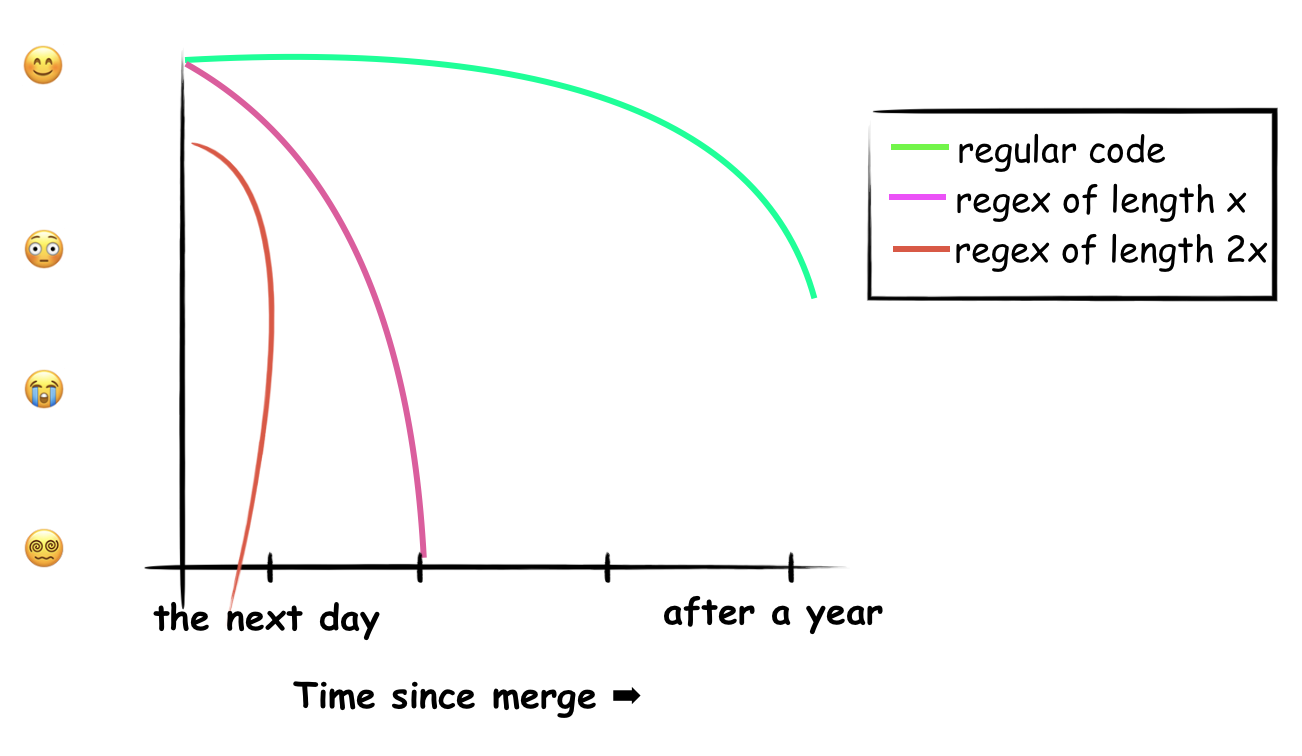
    <content type="html"><![CDATA[<div><p>If you use regular expressions on a, ehm, regular basis, you know it results in code with a short half-life. That carefully crafted string—the one you wrestled into existence through sheer trial and error, tweaking greedy quantifiers here, adding lazy ones there, until it finally worked. In a week or two, it&apos;ll be completely opaque. For your teammates, probably sooner. 😬</p><!-- end-of-preview --><p>Add to this the factor length and we can draw a nice XKCD-style graph:</p><p><img alt="Screenshot 2024-02-26 at 12.12.09.png" src="/assets/regex-learning-curve.png" /></p><p>In this article I&apos;ll describe 2 ways to make your regular expressions clearer and thus better maintainable.</p><h2 id="comments">comments</h2><p>Definitely the best way to make your regular expressions easier on the eyes is to insert comments. And this can be simply done by switching on the comment-flag, supported by most regex engines: <code>(?x)</code>.<br />Say, we need a regex to match a simple URL like <code>&quot;https://google.com/search#fragment&quot;</code>, then the difference might be something like this:</p><pre class="line-numbers"><code class="language-clojure">;; without comments
#"https?://([^:/]+)(?:\:([^/]+))?(?:(/[^\#]*)(?:\#(.+))?)?"

;; commented
#"(?x) # match e.g. 'https://google.com:8000/search#fragment'
  https?://      # 'http://' or 'https://'
  ([^:/]+)       # capture 'google.com'
  (?:\:          # (optional) ':8000'
    ([^/]+))?      # capture '8000'
  (?:            # (optional) '/search#fragment'
    (/[^\#]*)      # capture '/search'
    (?:\#          # (optional) '#fragment'
      (.+))?         # capture 'fragment'
  )?
"
</code></pre><p>The comment-flag instructs the regex engine to ignore any whitespace (i.e. trailing, leading <em>and</em> in between!), newlines, as well as anything following a <code>#</code>. And so we have numerous options to make it clearer what&apos;s going on where by spreading the various groups out over multiple lines, use indentation and add comments.</p><p>Just be aware that when you <em>want</em> to match <code>#</code> or whitespace, you should escape these like on line 12 in the example above.</p><p>Compare:</p><pre class="line-numbers"><code class="language-clojure">;; without comments
;; match specific tags separated by at least one whitespace
(re-find #"#foo +#bar"
  "Tags: #foo #bar") ;; => "#foo #bar"
(re-find #"#foo +#bar"
  "Tags: #foo#bar") ;; => nil

;; comments enabled
;; now it matches anything as it's one big comment
(re-find #"(?x)#foo +#bar"
  "Tags: #foo #bar") ;; => ""
;; escaping '#' is not enough though:
(re-find #"(?x)\#foo +\#bar"
  "Tags: #foo #bar") ;; => nil
;; ...because it now matches
(re-find #"(?x)\#foo +\#bar"
  "Tags: #foo#bar") ;; => "#foo#bar"
;; ...and
(re-find #"(?x)\#foo +\#bar"
  "Tags: #foooooooo#bar") ;; => "#foooooooo#bar"
;; it's as if we wrote #"#foo+#bar"

;; fix: escaping both '#' and whitespace
(re-find #"(?x)\#foo\ +#bar"
  "Tags: #foo #bar") ;; => "#foo #bar"
</code></pre><p>Enabling comments is a big help in solving the problem that regular expressions are mostly very dense one-liners.</p><h2 id="named-captures">named captures</h2><p>Another thing that makes regular expressions better readable are so called &apos;named capturing groups&apos;.<br />This is essentially a way to self-document the capture groups. So instead of <code>([^:/]+)</code> to capture the host, you&apos;d use <code>(?&lt;host&gt;[^:/]+)</code>.<br />Besides self-documenting, it also has the benefit of not relying on the position of the group when using back references, or when extracting the data that was captured.</p><p>Consider the following example where we solely seek URLs containing a particular env (such as staging or production) in both the subdomain and the path:</p><pre class="line-numbers"><code class="language-clojure">;; should match "https://staging.host.org/staging/some/path"
;; but not "https://staging.host.org/other-env/some/path"
;; without named captures: reference by position
#"^https://([^.]+)\.host\.org(/\1/.+)"

;; named captures: reference by name
#"^https://(?<env>[^.]+)\.host\.org(/\k<env>/.+)"
</code></pre><p>Also retrieving the captured data is no longer positional:</p><pre class="line-numbers"><code class="language-clojure">;; positional
(get (re-find #"^https://([^.]+)\.host\.org(/\1/.+)"
              "https://staging.host.org/staging/some/path") 1)
;; => "staging"

;; named captures
(let [matcher (re-matcher #"^https://(?<env>[^.]+)\.host\.org(/\k<env>/.+)"
                          "https://staging.host.org/staging/some/path")]
         (when (.find matcher)
           (.group matcher "env")))
;; => "staging"
</code></pre><p>Names captures do away with the magic numbers that are otherwise necessary both for back referencing and retrieval.</p><p>Combining comments and named capturing groups for our URL matching regex:</p><pre class="line-numbers"><code class="language-clojure">#"(?x) # match e.g. 'https://google.com:8000/search#fragment'
  https?://             # 'http://' or 'https://'
  (?<host>[^:/]+)       # 'google.com'
  (?:\:                 # (optional) ':8000'
    (?<port>[^/]+))?      # '8000'
  (?:                   # (optional) '/search#fragment'
    (?<path>/[^\#]*)      # '/search'
    (?:\#                 # (optional) '#fragment'
      (?<fragment>.+))?     # 'fragment'
  )?
"
</code></pre><h2 id="conclusion">Conclusion</h2><p>By applying two simple changes we turned our naive (but nonetheless already pretty unreadable) URL regex <code>#&quot;https?://([^:/]+)(?:\:([^/]+))?(?:(/[^#]*)(?:#(.+))?)?&quot;</code> into something (hopefully) more readable and thus better maintainable. Happy regex-ing!</p></div>]]></content>
  </entry>
  <entry>
    <id>https://www.gertgoet.com/direnv.html</id>
    <link href="https://www.gertgoet.com/direnv.html"/>
    <title>Sharp tools: direnv</title>
    <updated>2020-10-28T23:59:59+00:00</updated>
    <content type="html"><![CDATA[<div><p>In this article we&apos;ll take a look at <a href="https://direnv.net/">direnv</a>, a tool I&apos;ve been using for years to manage environment variables when developing projects. It recently got new features that especially teams can benefit from.</p><!-- end-of-preview --><h2 id="intro">intro</h2><p>A lot of runtimes and applications can be configured using environment variables. Take git for example: no less than <a href="https://git-scm.com/book/en/v2/Git-Internals-Environment-Variables">3 dozen knobs</a> are given to the user.</p><p>Same thing goes for a lot of runtimes for programming languages: there&apos;s around 7 variables showing up in my env that determine what ruby version is active in my shell and where ruby libraries are to be found and installed.</p><p>Probably the application you&apos;re building has a bunch of environment variables as well.</p><p>Direnv allows you to manage these environment variables on a per-folder basis. As it supports various shells (bash, zsh, tcsh, fish and elvish) and platforms, it&apos;s relatively easy to introduce in a team.</p><h2 id=".envrc">.envrc</h2><p>Direnv is all about <code>.envrc</code> files. Let&apos;s take a simple example:</p><pre><code class="language-bash"># ~/projects/some-project/.envrc
export DATABASE_URL=postgres://host:5432/db1
</code></pre><p>Now when you enter <code>~/projects/some-project</code> (or any folder below it) direnv will make sure to update your environment. It will unset the variables once you leave the project.</p><h2 id="stdlib">stdlib</h2><p>There&apos;s all sorts of helper functions from the <a href="https://direnv.net/man/direnv-stdlib.1.html">standard library</a> at your disposal. Take for example prepending a project-folder to $PATH:</p><pre><code class="language-bash"># ~/projects/some-project/.envrc
PATH_add bin
</code></pre><p>Way more intuitive and less error-prone than <code>export PATH=$PWD/bin:$PATH</code>!</p><p>For PATH-like variables you can use <code>path_add</code>:</p><pre><code class="language-bash">path_add GOPATH go
</code></pre><p>Another variable that is often handy to have is <code>PROJECT_ROOT</code>, let&apos;s add it:</p><pre><code class="language-bash">export PROJECT_ROOT=$(expand_path .)
</code></pre><p>This way scripts don&apos;t need to construct paths, but instead can just use <code>$PROJECT_ROOT/some/file</code>.</p><p>We&apos;ll see some more functions from the stdlib in the tips below.</p><h2 id="customization">customization</h2><p>While having <code>export DATABASE_URL=postgres://localhost:5432/some_database</code> in a project&apos;s <code>.envrc</code> is a great way to communicate what environment variables your application expects (and what &apos;shape&apos; the value should have), the exact value will probably differ between developers on a team.<br />To allow any value to be overridden locally add the following to the bottom of your .envrc file:</p><pre><code class="language-bash"># file: ~/projects/some-project/.envrc
export DATABASE_URL=postgres://localhost:5432/db1

if [[ -f &quot;.envrc.local&quot; ]]; then
  source_env &quot;.envrc.local&quot;
fi

# better (see note below):
source_env_if_exists &quot;.envrc.local&quot;
</code></pre><p>Then in case the defaults don&apos;t suffice, a developer can put overrides in <code>.envrc.local</code>.</p><p>UPDATE: I opened an issue with a suggestion to include this idiom in the stdlib. The author kindly delivered; so as of <a href="https://github.com/direnv/direnv/releases/tag/v2.24.0">v2.24.0</a> the above would become <code>source_env_if_exists &quot;.envrc.local&quot;</code>.</p><h2 id="inheriting">inheriting</h2><p>By default direnv only considers the <em>first</em> <code>.envrc</code> it finds going up the folder chain starting at $PWD.<br />If you want to &apos;inherit&apos; from a <code>.envrc</code> higher up use <code>source_up</code>.<br />Typically I use this when having multiple projects under a client-folder:</p><pre><code class="language-bash">~/projects
└── client
    ├── project1
    └── project2
</code></pre><p>Now when you need e.g. client-specific git-settings, you&apos;d do:</p><pre><code class="language-bash"># file: ~/projects/client/.envrc
export GIT_AUTHOR_EMAIL=user@client.org

# then in ~/projects/client/project1/.envrc ^1
source_up
...other stuff
</code></pre><p>^1: for the sake of example this is <code>.envrc</code>, typically you&apos;d treat this as a personal setting and put <code>source_up</code> in <code>.envrc.local</code></p><p>You might be tempted (as I was before I RTFM) to use this to define global settings in <code>~/.envrc</code>. Don&apos;t do it, these belong in <code>~/.config/direnv/direnvrc</code> or <code>~/.config/direnv/lib/*.sh</code>.</p><h2 id="ci">CI</h2><p>The project provides statically linked binaries for a wide variety of platforms, so using the latest version in a CI-job is easy:</p><pre><code class="language-bash"># in an alpine-container
$ apk add bash #^1
$ DIRENV_VERSION=2.23.1 sh -c &apos;wget https://github.com/direnv/direnv/releases/download/v${DIRENV_VERSION}/direnv.linux-amd64 -O /usr/bin/direnv&apos; &amp;&amp; chmod +x /usr/bin/direnv
$ direnv allow /path/to/working-directory
# ^2
$ direnv exec /path/to/working-directory setup
</code></pre><p>^1: bash is required as direnv evaluates the contents of <code>.envrc</code> files in a bash subshell (and copies environment variables that changed to the active shell).<br />^2: at this point you might want to source CI-specific values to override the defaults from the .envrc</p><h2 id="extending">extending</h2><p>Extending the standard library with your own functions is easily done by writing a bash function and putting it under <code>~/.config/direnv/lib/*.sh</code>.</p><p>Say for example that we&apos;d like to have an expressive way to set a specific version of the JDK.<br />Create <code>~/.config/direnv/lib/java.sh</code> containing the following:</p><pre><code class="language-bash">#!/usr/bin/env bash

# NOTE this only works on MacOS
use_jdk() {
  export JAVA_HOME=$(/usr/libexec/java_home -v&quot;$1&quot;);
}
</code></pre><p>Then in a <code>.envrc</code>:</p><pre><code class="language-bash">use jdk 15 #^1
</code></pre><p>^1: We&apos;re using direnv&apos;s helper function <code>use</code> that delegates to the appropriate <code>use_*</code> function.</p><p>The problem of these custom functions is that they are hard to use in a team-context: in order to use this <code>.envrc</code> it would require everyone on the team to have the java.sh in their lib-folder.</p><p>Though, with the recent introduction of <code>source_url</code> we can make our <code>.envrc</code> self-containing again.<br />The only thing we need to do is store <code>java.sh</code> somewhere publicly accessible (e.g. as gist) and change our <code>.envrc</code>:</p><pre><code class="language-bash">direnv_version 2.23 #^1

# ^2
source_url &quot;https://gist.githubusercontent.com/eval/049354b2d4ebd1e6f67440e4b98fffc5/raw/939c8b0767579866d6fa2a5cec2f215c82feca5c/java.sh&quot; &quot;sha256-TvMUsEtbn8ruOSNNIfcMNK3XWqXTPtGpKGkV3RARGU4=&quot;

use jdk 15
</code></pre><p>^1: ensure to trigger an error when using older direnv versions that don&apos;t support all functions we use in this .envrc<br />^2: the script will be downloaded and its integrity-hash verified before being sourced.<br />NOTE: To find the integrity hash for a script, leave it out and follow the instructions that <code>direnv allow</code> shows.</p><h2 id="conclusion">conclusion</h2><p>For years I found direnv to be an indispensable tool for development. The recently added capability to include external scripts makes it an even more powerful tool, especially for teams.</p></div>]]></content>
  </entry>
</feed>